Dub
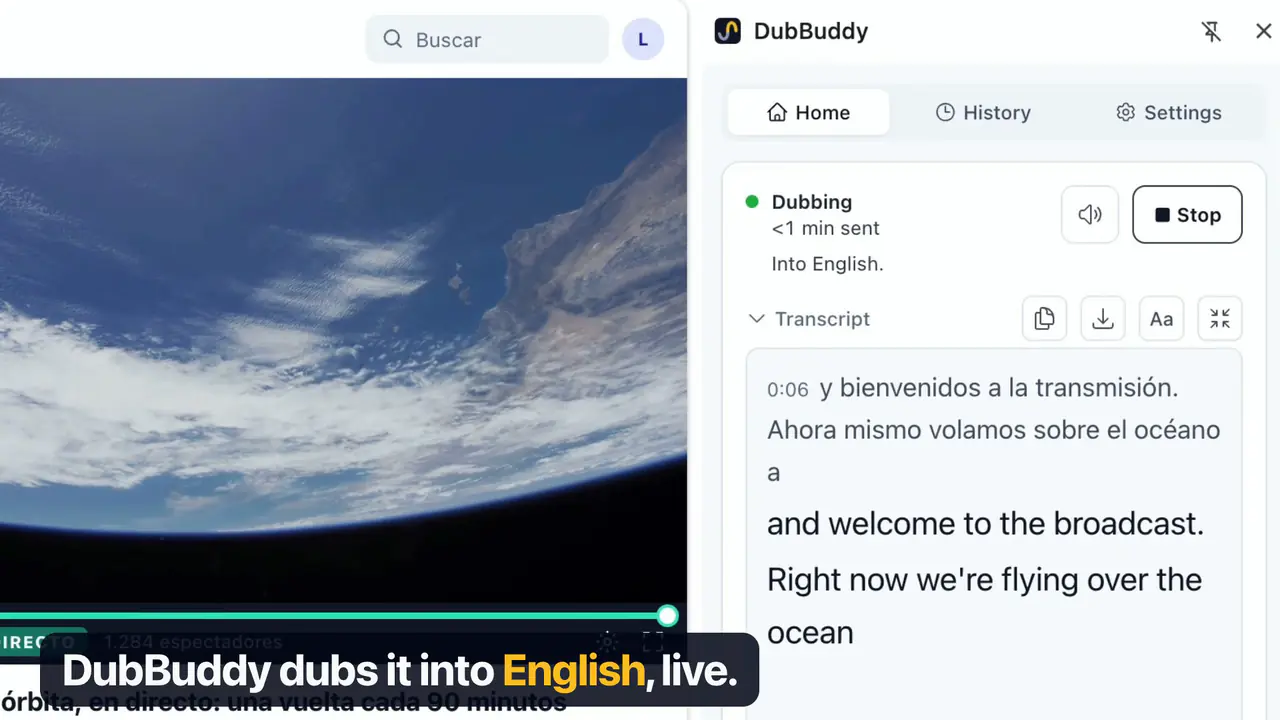
78 languagesYour language, about 3 seconds behind the speaker, with the original voice underneath.

Hear any video, live stream or meeting in your language as it plays, over the original voice, or read it as a translated transcript.
DubBuddy is a Chrome extension for computers. It does not run on phones or tablets.
Chrome’s own pages can’t be captured, and some DRM-protected players give no sound. Other people’s voices in a tab go to Google too: make sure you’re allowed to.
Get a Gemini API key in Google AI Studio and turn on billing.
Paste it into DubBuddy: it stays encrypted on your computer.
Click the DubBuddy icon on a video, then press Start.
Your language, about 3 seconds behind the speaker, with the original voice underneath.
82 languages heard
Each line as it’s said, with its translation under it if you like.

At Google’s own prices, which it sets and may change.
At Google’s paid-tier prices on 30 October 2026. Google’s price list ↗
An estimate at Google’s paid-tier prices on 30 October 2026 (Google’s price list ↗). Your bill is at Google, never here.
The audio, and any lines to translate, go straight to Google, only while a session you started runs.
DubBuddy reads nothing from the page; Chrome tells it the tab’s title and address.
Each session’s words stay here, never the audio. Off in Settings.
Something else? Write to support@dubbuddy.com.
About 3 seconds, and the first words arrive about 5 seconds after Start. The original is lowered only while the dub plays, so you still hear the speaker underneath. Machine translation can mishear names and terms.
You pick the language; Google’s model picks the accent and the variety of the language the dub speaks, and DubBuddy cannot change them. An Arabic dub, for example, can come out in colloquial Egyptian Arabic rather than Modern Standard Arabic.
Those parts are not dubbed: you hear the speaker. The audio is still sent and billed, so on a tab wholly in your language the panel says so (“Already in English”), and the session stops by itself after 20 minutes of sound with no dub.
YouTube dubs some recorded videos itself, in advance and free, and its dub replaces the voice. DubBuddy dubs whatever the tab plays, live streams included, into any of 78 languages, keeps the voice underneath and runs only when you press Start; Google bills your key. See how the two compare.
Chrome 116 or later on a computer, and a Gemini API key from Google AI Studio, which Google bills. Google’s Gemini API terms apply to the key (18+), and the Gemini API is not available in every region. DubBuddy does not run on phones.
Yes: Microsoft Edge, Opera, Vivaldi and Brave (tested in October 2026), installed from the Chrome Web Store. Not Firefox or Safari: they don’t let an extension capture a tab’s audio.
Its panel and welcome page are in the 15 languages of this site. It follows your browser’s language, and you can change it at the top of Settings.
That is how Chrome words the permission to capture a tab’s audio. DubBuddy captures only the audio of the tab you start it on, never video, and runs no code in the pages you visit. The privacy policy says exactly what it sends, to whom, and what it keeps.
Add DubBuddy to Chrome, paste a Gemini API key, and click the icon on a video.
DubBuddy is a Chrome extension for computers. It does not run on phones or tablets.